dockurr/dnsmasq
Dnsmasq in a Docker container.
1M+
dockurr/dnsmasq repository overview
dnsmasq




Docker container of dnsmasq, an open-source DNS server.
Features ✨
- Provides a lightweight DNS/DHCP server
- Forwards DNS queries to upstream resolvers
- Supports local hostname and domain resolution
- Supports DHCP leases and static reservations
- Supports custom DNS records and hosts files
- Allows custom
dnsmasq.confconfiguration - Lightweight Alpine-based image
Usage 🐳
Docker Compose:
services:
  dnsmasq:
    image: dockurr/dnsmasq
    container_name: dnsmasq
    environment:
      DNS1: "1.0.0.1"
      DNS2: "1.1.1.1"
    ports:
      - 53:53/udp
      - 53:53/tcp
    restart: always
Docker CLI:
docker run -it --rm --name dnsmasq -p 53:53/udp -p 53:53/tcp -e "DNS1=1.0.0.1" -e "DNS2=1.1.1.1" docker.io/dockurr/dnsmasq
Configuration ⚙️
You can configure up to four upstream DNS servers using the DNS1 through DNS4 environment variables.
For example, you can set them to the public Cloudflare servers like this:
environment:
  DNS1: "1.0.0.1"
  DNS2: "1.1.1.1"
You can extend the default configuration template with a volume that mounts a directory containing *.conf configuration files:
volumes:
  - ./dnsmasq.d/:/etc/dnsmasq.d/
You can also provide a custom main configuration with a volume that binds your own dnsmasq.conf file:
volumes:
  - ./dnsmasq.conf:/etc/dnsmasq.conf
FAQ 💬
-
How to set up the DNS server?
By default, dnsmasq acts as a forwarding DNS server. Queries that cannot be answered locally are forwarded to the upstream DNS servers configured with DNS1 through DNS4:
environment:
  DNS1: "1.0.0.1"
  DNS2: "1.1.1.1"
Dnsmasq is a forwarding resolver, so it relies on these upstream servers rather than performing full recursive resolution itself.
Clients can then use the IP address of the host running this container as their DNS server.
Dnsmasq also caches DNS responses, so repeated queries can be answered locally without contacting the upstream resolver again.
The cache size can be adjusted with the CACHE_SIZE environment variable:
environment:
  CACHE_SIZE: "1000"
You can also provide local DNS records through /etc/dnsmasq.d/. For example, create ./dnsmasq.d/local.conf with:
address=/server.lan/192.168.1.10
address=/printer.lan/192.168.1.20
and mount the directory into the container:
volumes:
  - ./dnsmasq.d/:/etc/dnsmasq.d/
Queries for these names are answered locally, while all other queries continue to be forwarded to the configured upstream DNS servers.
-
How do
DNS1throughDNS4interact with custom configuration?
DNS1 through DNS4 configure the default upstream DNS servers when the image uses its generated configuration.
If you provide your own /etc/dnsmasq.conf, these environment variables are ignored:
volumes:
  - ./dnsmasq.conf:/etc/dnsmasq.conf
If you extend the default configuration through /etc/dnsmasq.d/ and define your own global upstream server:
server=192.168.1.1
the default upstream servers are not added.
Domain-specific servers do not replace the default upstreams. For example:
server=/corp.example/192.168.1.1
only changes resolution for corp.example.
-
How to set up the DHCP server?
To use dnsmasq as a DHCP server, the container requires additional network capabilities:
cap_add:
  - NET_RAW
  - NET_ADMIN
NET_RAW allows dnsmasq to check whether an address is already in use before assigning it to a client. NET_ADMIN is required for network operations used by DHCP, such as managing ARP entries.
The container must also be reachable by DHCP clients on UDP port 67. Because DHCP discovery uses broadcast traffic, normal container bridge networking may not be suitable.
On Linux, the simplest option is usually host networking:
services:
  dnsmasq:
    image: dockurr/dnsmasq
    network_mode: host
    cap_add:
      - NET_RAW
      - NET_ADMIN
    volumes:
      - ./dnsmasq.d/:/etc/dnsmasq.d/
    restart: always
Alternatively, you can use a network driver such as macvlan or ipvlan when the container should have its own address on the local network.
DHCP is enabled by adding a dhcp-range to the dnsmasq configuration. For example, create ./dnsmasq.d/dhcp.conf with:
dhcp-range=192.168.1.100,192.168.1.200,255.255.255.0,12h
This assigns addresses from 192.168.1.100 through 192.168.1.200 with a lease time of 12 hours.
-
Port 53 is already in use?
If another process on the host is already listening on port 53, the container may fail to start with an error similar to:
Error response from daemon: driver failed programming external connectivity on
endpoint dnsmasq (...): Error starting userland proxy: listen tcp4 0.0.0.0:53:
bind: address already in use
On Linux, you can check which process is using port 53 with:
sudo ss -lntup | grep ':53'
A common example is systemd-resolved, but other DNS services such as bind, unbound, or another dnsmasq instance may also be using the port.
If the service only occupies port 53 on one host address, you can bind the container to a different address:
ports:
  - "192.168.1.10:53:53/udp"
  - "192.168.1.10:53:53/tcp"
Otherwise, stop or reconfigure the conflicting service before starting the container.
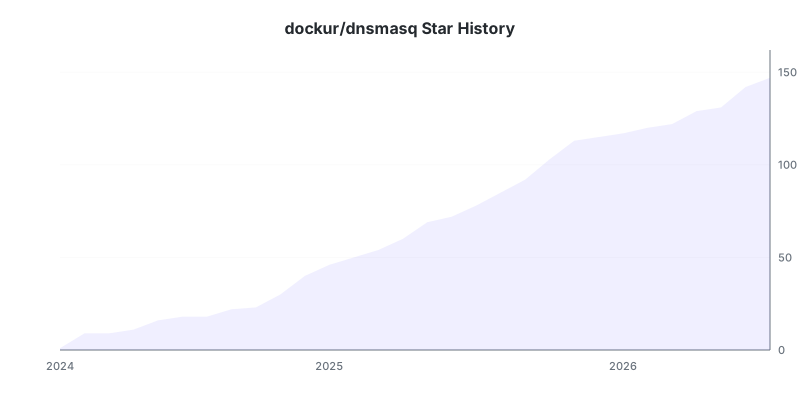
Stars 🌟
Tag summary
Content type
Image
Digest
sha256:b40fbaa3a…
Size
5.2 MB
Last updated
3 days ago
docker pull dockurr/dnsmasqThis week's pulls
Pulls:
143,901
Last week